An effective SharePoint naming convention prevents sync errors, broken URLs, and helps users find documents. Stick to alphanumeric characters, use hyphens and/or underscores as separators, and keep names concise while relying on Microsoft 365 metadata to handle dates. Hyphens are preferred over underscores because a lot of platforms index hyphens specifically. For example, budget-report is recognized as budget + report for search terms. Using hyphens will allow the search feature to better find what you search for.
Also note that long names are truncated in the view. If the variable information is at the end of similar titles with long names, your list of files will appear all the same like in the example below:

Characters to Avoid
- Special characters: Never use ' ~ " # % & * : < > ? / \ { | } , SharePoint blocks many of these outright and using them breaks links.
- Leading/Trailing spaces: Do not start or end a file name with a period or a space.
1. Structure and Formatting
- Use delimiters: Separate words using hyphens - and/or underscores _. Hyphens are preferred.
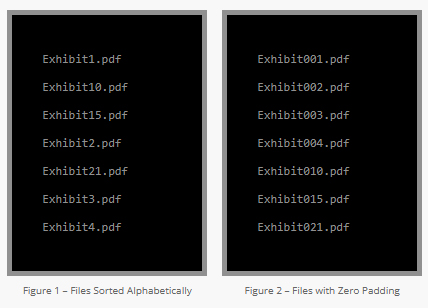
- Logical ordering: File names are stored as logical strings in almost every operating system and database management system. It causes files with names containing numerals to be sorted counter intuitively. Contents of a folder containing 7 files with numeric suffixes are sorted as shown in Figure 1. To avoid this issue, you can pad the file names with zeros so that they are ordered correctly when sorted alphabetically as in Figure 2.
Avoid using dates in file names unless absolutely necessary. SharePoint tracks Created and Modified dates automatically. If you must include a date, use the international standard formatYYYYMMDD(e.g.,20260617) so files sort chronologically. - Keep it short: Aim for file name clarity in roughly 80 characters or less. SharePoint has a 400-character limit for the total file path (folder hierarchy + file name). If you create many levels of folders, you increase the characters in the URL decreasing what's left for files names.
Format: [Topic]-[Details]-[Status or Version]
Example: BudgetReport-FY2026-Q1-Final.docx
Example: OnboardingGuide-RemoteEmployees-Draft.pdf
- Use MetaData: Avoid burying descriptive information (like Client Name or Department) strictly in the file name. Instead, add custom columns to your SharePoint Document Library to store this information (metadata). This makes it easy to filter and search without requiring long, clunky file names.